Leg
Type leg claude, leg codex, leg agy or leg grok instead of the bare command. You get the same interactive agent; Leg opens a board next to it, watches the usage limit, keeps a handoff bundle current, and when the limit hits it starts the next agent in the same terminal from that bundle.




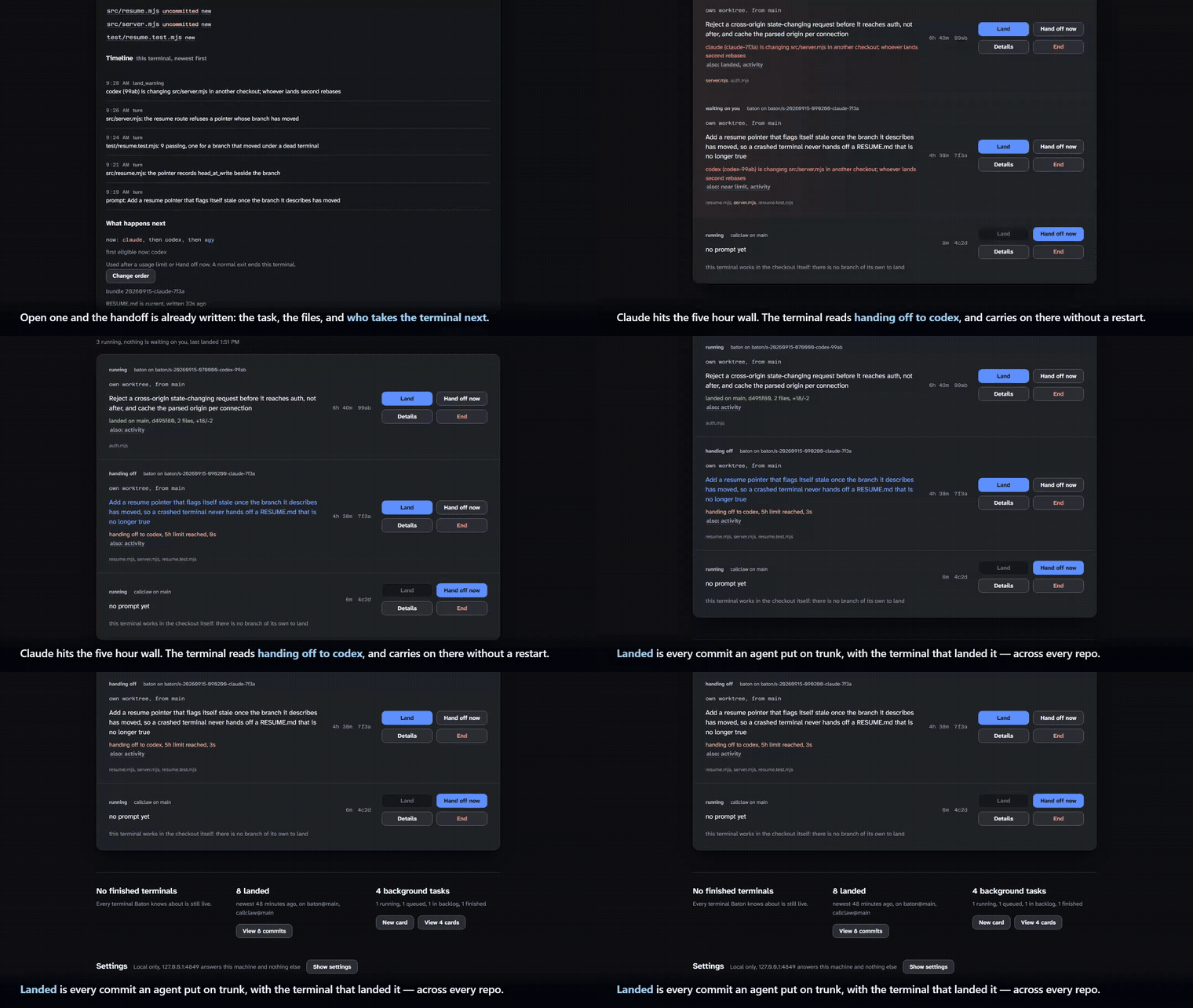
Claude hits the five-hour wall. The terminal reads handing off to codex, and codex carries on there. Nothing is retyped. (the full 53-second run)
You keep using your coding agents exactly as you do today, in any terminal,
from your own config directory: Leg adds its hooks in a separate per-session
settings file. Client approval and trust behavior is preserved by default.
Permission bypass requires explicit opt-in.
Client config writes require the separate folder-trust opt-in
or portable harness. leg claude --model opus is
claude --model opus with four things running alongside it:
- A board. Opened once in your browser, reused after that. Every Leg
session in every terminal is a row on it, and the row's register reads
status, repo on branch, uncommitted and unpushed counts, agent and model,
and how long it has been quiet:
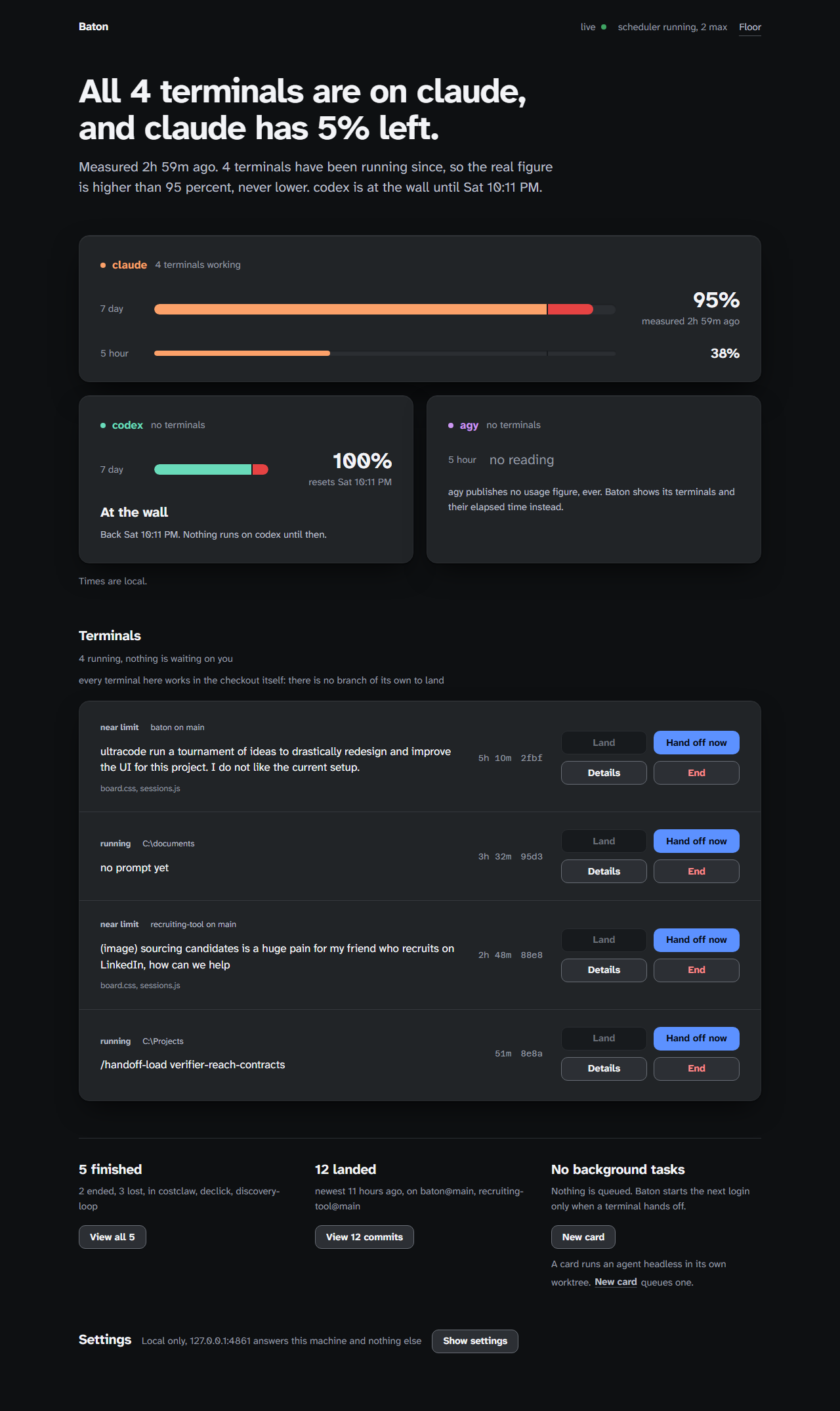
waiting on you leg on main dirty 3 ahead 2 claude/fable. Under that come the prompt, the one thing worth knowing, the files it is touching and the usage bucket that will stop it. Capacity is one strip at the top rather than a region, with the login panels and their gauges behind Capacity and models. Two sessions editing the same file in one repo are flagged on both rows, and a second session in a checkout that already has one gets its own worktree and a Land button instead of writing over the first. - Usage tracking per agent and account, from what each CLI already
exposes: Claude Code's usage endpoint and its
StopFailurehook, Codex's read-only app-server rate-limit read, agy's log, and Grok's billing proxy endpoint. - A context handoff bundle (context-handoff-bundle) refreshed as the session goes, so the work is always ready to hand off.
- The handoff itself. Near the limit you get a warning. At the limit Leg
saves the bundle, stops the agent, and starts the next option in the same
terminal from that bundle. The options are a ladder of rungs, and a rung is
an agent, a login and a model: the default is
claude/fable,claude/opus,claude/sonnet, then each remaining installed agent. A Fable limit walls Fable and not the login, so the first move is usually to another model on the same subscription, and for claude that move isclaude --resume <id> --model opus, which keeps the conversation instead of replaying the bundle. Only when every claude rung is out does it move to another CLI. Settings holds the ladder for new terminals,leg ladderedits it from a shell, and Details on a row edits the copy that terminal is running. Nothing is retyped. When every rung is out, Leg tells you which resets first and when, waits for that reset with a countdown, and starts that agent from the bundle.
Subscription logins only: Leg strips ANTHROPIC_API_KEY,
ANTHROPIC_AUTH_TOKEN, ANTHROPIC_BASE_URL, ANTHROPIC_CUSTOM_HEADERS,
OPENAI_API_KEY, OPENAI_BASE_URL, OPENAI_API_BASE, GEMINI_API_KEY,
GOOGLE_API_KEY, GOOGLE_GEMINI_BASE_URL, GOOGLE_GENAI_USE_VERTEXAI,
GOOGLE_GENAI_USE_ENTERPRISE, GOOGLE_CLOUD_PROJECT,
GOOGLE_CLOUD_LOCATION, GOOGLE_APPLICATION_CREDENTIALS, GROK_API_KEY,
XAI_API_KEY, CLAUDECODE, CLAUDE_CODE_*, CLAUDE_EFFORT, and
CLAUDE_PLUGIN_DATA before any agent starts. It then sets
CLAUDE_CODE_PRINT_BG_WAIT_CEILING_MS=0 for a detached
Claude print session. Leg's hooks ride in a separate per-session --settings
file. Automatic folder-trust writes are off by default; LEG_TRUST=auto
opts into the client config changes below. The optional
portable harness can also write client configuration,
only after leg harness enable. leg uninstall removes only ~/.leg;
it does not remove existing client trust answers.
The folder-trust answer
Each agent CLI asks once, the first time it runs in a directory, whether you
trust that folder, and Claude Code asks a second question when a CLAUDE.md
above the repo imports a file from outside it. These prompts remain in place
by default, including during handoffs. An unattended handoff may wait for you.
Set LEG_TRUST=auto only if you want Leg to record trust before agent launches
and handoffs. This is independent of auto-approve mode and authorizes these
client config writes, including approval of external CLAUDE.md imports:
| agent | file | what is written |
|---|---|---|
| claude | ~/.claude.json (or $CLAUDE_CONFIG_DIR/.claude.json) |
projects["<repo>"].hasTrustDialogAccepted: true |
| claude | the same entry, only when such an import exists | hasClaudeMdExternalIncludesApproved, hasClaudeMdExternalIncludesWarningShown |
| codex | ~/.codex/config.toml |
[projects."<repo>"] trust_level = "trusted" |
| agy | ~/.gemini/antigravity-cli/settings.json |
trustedWorkspaces: ["<repo>", "<worktree>"] |
| agy | ~/.gemini/config/projects/default-cli-project.json |
writable Git folder resources |
| agy | existing ~/.gemini/trustedFolders.json |
TRUST_FOLDER entries |
For Claude Code this is the documented remedy: its permissions guide says to
set projects["<path>"].hasTrustDialogAccepted to true in ~/.claude.json,
where <path> is the repository root.
Claude and Codex trust updates require an existing config file. agy can create
its settings or project file when the corresponding config directory already
exists. Existing trust decisions are retained. When Leg approves an external
CLAUDE.md import it prints the
full path of every file it approved, to the terminal and to the session
timeline on the board, so the approval is on the record rather than invisible.
LEG_TRUST=never disables future trust writes; it does not revoke trust already
recorded. Unset, empty and unrecognized values also leave automatic trust off.
The legacy BATON_TRUST=auto opt-in remains supported when LEG_TRUST is unset.
Contents
- 60-second run
- What Leg reads from each agent
- How a handoff works
- Two sessions in one repo
- More than one human
- The board
- Every conversation on this machine
- Second accounts, and what the terms say
- What is and is not touched
- CLI reference
- Background tasks: the v0.1 extras
- Troubleshooting
- Documentation
- Contributing
- License
60-second run
Prerequisites: Node 22 or newer, git, Python 3 with pip, and at least one
logged-in agent CLI (claude, codex, agy or grok).
npm install -g @ucsandman/legcli
pip install -U context-handoff-bundle
cd <any repo>
leg claude
npm install -g leg-agents is the same release: it pins this version of
@ucsandman/legcli and exposes the same leg binary.
That is the whole setup. The first leg <agent> starts the board on
http://127.0.0.1:4747 and opens it; later sessions reuse it. Anything after the
agent name passes straight through (leg codex -m gpt-5.3-codex-spark,
leg claude --resume). The agent's own prompt and permission flags pass
through unchanged. Leg adds no permission bypass by default; --auto-approve
opts in and --no-auto-approve overrides a saved opt-in for that terminal.
Leg's hooks ride in a separate per-session --settings file. Folder-trust
and portable-harness writes each require their own opt-in.
Leg is commercial, source-available software, and the source is on
GitHub: every .mjs file that runs is in the package you just installed, at
$(npm root -g)/legcli/src, and the license lets you read it and modify
your own copy. There is nothing compiled, minified or bundled to see through.
What Leg reads from each agent
Nothing is guessed from screen scraping. Each tap was read from the CLI's source or documentation and then checked on a real machine (2026-09-11, Claude Code 2.1.268, codex-cli 0.153.4, agy 1.2.0); the rightmost column says which.
| agent | usage percentages | the wall (limit hit) | how Leg attaches | status |
|---|---|---|---|---|
| claude | GET api.anthropic.com/api/oauth/usage with the login Claude Code stored, the same data as /usage and the built-in status line (five_hour, seven_day, utilization, resets_at); polled every 60 s |
StopFailure hook with error: rate_limit (docs) |
one extra settings file per session via --settings, carrying only Leg's own hooks; autoContinueAtUsageLimit is set to false because Leg owns the handoff |
observed live |
| codex | read-only account/rateLimits/read through the app-server, polled every 60 s by the board and active attach; windows are identified by duration (300 minutes = 5h, 10080 = 7d) |
task_complete.error.codex_error_info: usage_limit_exceeded, message "You've hit your usage limit … try again at …" (codex-rs/protocol/src/error.rs) |
no model turn and no hook are injected; the board reads the CLI backend and records only returned windows | verified by source and regression tests |
| agy | none exposed (agy's own status line fetches a quota summary that is written nowhere) | RESOURCE_EXHAUSTED, "it resets in …", "out of quota" in the log |
--log-file per session; ~/.gemini/antigravity-cli/history.jsonl gives the prompts and conversation id |
observed live (a real RESOURCE_EXHAUSTED with its reset was read from the log on 2026-09-11) |
| grok | GET cli-chat-proxy.grok.com/v1/billing?format=credits and GET cli-chat-proxy.grok.com/v1/user?include=subscription with OAuth token from ~/.grok/auth.json (creditUsagePercent, currentPeriod weekly reset); polled every 60 s |
-32003 rate limit error, "You've hit the rate limit for your plan. Try again later.", "Rate limited (429)", StopFailureKind::RateLimit (xai-org/grok-build) |
--debug-file grok.log per session; ~/.grok/sessions/<encoded-cwd>/prompt_history.jsonl gives prompts and session id |
verified by source and proxy endpoint |
Why not Claude Code's status line JSON (rate_limits.five_hour.used_percentage):
on 2.1.268 the custom statusLine Leg passes through --settings did not
run, so the endpoint poll is the source. Leg still writes a statusLine
entry that records the same fields, so the moment a build honours it the poll
becomes a fallback.
For Codex, Leg does not infer availability from a lower percentage: only an
explicit available answer from the backend clears an earlier wall. The board
labels each bar as <n>% used and marks an old reading as stale rather than
presenting it as current.
How a handoff works
- Warning. At 85 % of any window (
LEG_WARN_PCT) the session card turns amber, the event log names the next option, and the terminal bell rings once. - Limit. claude: the
StopFailurehook fires withrate_limit. codex: the rollout reportsusage_limit_exceeded. agy: the log saysRESOURCE_EXHAUSTED. The account is marked walled until the reset the CLI reported (or the soonest known window reset). - Bundle. Leg writes structured notes (task, the last messages from the
transcript,
git diff --stat, dirty files, files edited this session, recent commits, why it stopped) and runscontext-handoff-bundle save --repo-localwith one slug per session, updated in place (--update <slug>) at every checkpoint, about every two minutes while the session is active, and at every warning, limit and hand-off. If the session maintained.leg/SYNTHESIS-<session-id>.md, Leg inlines it into the resume file as a## Synthesissection ahead of the raw dump. - Switch. The agent process is stopped and the terminal is restored. Two
claude destinations keep the conversation itself instead of the bundle: a
weaker model on the same login (
claude --resume <id> --model <alias>), and another claude login you added withleg accounts add, which sees the same transcript through theprojectsjunction the account carries (claude --resume <id>under that login'sCLAUDE_CONFIG_DIR). A weekly or Fable wall on one login then continues on the other with the conversation it already had, and the timeline sayskept the conversation. Every other rung starts in the same terminal with a short pointer prompt: read.leg/RESUME-<session-id>.md(thecontext-handoff-bundle loadoutput, the## Synthesissection if present, and the reason for the switch), checkgit statusandgit diff, continue, do not ask the human to restate the task. The pointer prompt directs the next agent to read Synthesis first, treat ruled-out approaches as settled, and start from the top-ranked next step. The same text is copied to.leg/RESUME.md, the file people open by habit, and both are stamped with the commit and the live terminals they describe.claude "<prompt>",codex "<prompt>"andagy -i "<prompt>"all open the normal interactive session with that first turn. - The ladder. A rung is an agent, a login and a model, and Leg walks from
rung 1 every time. Other models on the same login come first, then other
accounts of the same agent, then every other agent in the saved order, each
tried once. It is a priority list, not a rotation: put agy at the bottom and
agy is the last rung from a Claude terminal and from a Codex terminal alike.
The board prints the exact sequence with the rung running now marked, plus
the first rung eligible from current install and limit state. Use Change
the ladder in a terminal's expansion to change that terminal,
leg ladderto do it from a shell, or Settings to set the default copied by new terminals. A rung whose CLI is missing, whose wall has not reset, or that shares the window that is already out, is skipped with its reason. - All out. The terminal prints each option with its reset time, soonest
first, then stays open with a countdown to the first reset and starts that
agent from the bundle when it arrives. The row says
waiting for <agent> at <time>. Ctrl-C (or End on the row) quits with exit 3 instead.
You can force a handoff any time: the Hand off now button on the row, or
leg sessions handoff <id>. Verified on this machine: leg claude opened
the real Claude Code TUI with Leg's hooks firing into the session log, the
usage poll recorded 36 % of the 5h window and 74 % of the 7d window, the
warning fired at 96 % of the 7d window and named codex as the next option, and
a limit saved the bundle, stopped claude and started codex in the same
terminal with the pointer prompt. A real StopFailure arrived on 2026-09-11
and is kept at fixtures/live/claude/limit-rate_limit.json; to drive the path
on demand, leg sessions simulate-limit <id> sends the same StopFailure
rate_limit payload Claude Code would send through Leg's hook: verified end
to end on a haiku session, the hook set the limit, the runner saved the
bundle, stopped claude and started codex, which read .leg/RESUME.md on its
first turn. The simulated wall clears after two minutes and is never kept as
evidence. The first real StopFailure was saved that way, with secrets
scrubbed, at fixtures/live/claude/limit-rate_limit.json, and the claude docs
row flipped to observed-live (node scripts/live-limits.mjs). The same
capture is wired for codex usage_limit_exceeded and agy RESOURCE_EXHAUSTED;
no payload for either has been kept yet.
Terminals started by this version can change their ladder while they run: Settings holds the default for new terminals, and Details on a row edits the copy that terminal is running. An older terminal stays on the order it started with; its row says a restart is needed and can save the desired default for the next launch. A normal agent exit ends the terminal. It does not trigger a handoff.
The working environment travels too (optional)
With the portable harness enabled (leg harness enable,
off by default), the hand-off also prepares the destination's environment
before it starts: the source agent's global rules, identity, hooks, skills,
subagents, slash commands, MCP servers and permissions, rendered into the
destination's own files as far as it can represent them. The terminal then
reads, for instance, codex harness partial · 8/8 components, 3 dropped · 1 file(s) written, and the terminal's details list what was dropped and why.
The source is fingerprinted so an unchanged environment costs a few stat
calls; a policy (warn, sync, strict) says whether a hand-off may write,
and strict refuses a destination it cannot make safe. Credentials never move
and which login runs stays the account layer's decision.
Two sessions in one repo
Two agents in one working tree write over each other's files. So when you
start leg codex in a checkout where leg claude is already live, the new
session gets its own git worktree, <repo>/.leg-worktrees/<session-id> on
branch leg/<session-id>, cut from the branch the checkout has out, and the
terminal prints one line saying where it is. The agent starts there; the card,
the usage tracking and the handoff work the same. --no-worktree shares the
checkout on purpose (Leg takes the flag out; the agent never sees it).
The card of a session with its own worktree has a Land button. It sends
the branch through the merge queue: whatever the agent left uncommitted is
committed on the branch, the branch is rebased onto its base, the repo's test
command runs (package.json test, pytest, or none with a warning), and the
base is fast-forwarded, never merged. When a step fails nothing lands and the
card says why: rebase-conflict with the files, tests-red with the end of
the output, dirty-trunk when the checkout has local changes the landing
would overwrite. Local changes it would not touch are left alone. The
landed-on-trunk list says which terminal landed each commit. Remove safely
prunes a finished session only when its worktree is clean and its branch is
already on the base. Remove record is a separate visible button with a
confirmation: it removes only Leg's saved session record and deliberately
keeps the worktree, branch, unmerged commits, and dirty files.
Verified live on 2026-09-11 with three haiku sessions in a throwaway repo. The
first stayed in the checkout; the second and third each got a worktree and
appended a line to README.md. Land on the second, clicked on the real board,
ran the repo's tests and fast-forwarded main; Land on the third bounced with
rebase-conflict on README.md and kept its commit on its branch; the
landed-on-trunk list named the second terminal (the screenshot above).
More than one human
Off until you run it. leg share on binds the board to your Tailscale
address (or --bind lan, or an address you name) and gives every human their
own name and token; until then the board stays on 127.0.0.1 and there is no
token at all.
leg share on              your own link, printed once
leg share add sam         sam's link, printed once (a guest)
leg share add dana --role operator    dana runs cards, not this machine
leg share                 who is on the board (never a token again)
leg share rotate sam      sam's old link stops working
leg share off             back to 127.0.0.1; every link stops working
There are three roles. owner is everything: the machine's settings, the harness, every terminal, the cards, the history index and the audit trail. operator is the pipeline board and their own terminals: they add, run, approve, reassign and kill cards, and they never see this machine's settings, its home path, its repository paths, its conversation index or the audit. guest is the terminals lane, read-only and redacted, with Request handoff as their only button.
A token is kept as a sha256 hash, so a lost link is re-issued, never re-read. The board takes the token out of the address bar and keeps it in the browser. Your own browser on this machine needs no token.
What another human sees is the Terminals region, read-only. Each panel says
whose terminal it is. On a panel that is not theirs there is no prompt, no file
name, no path, no bundle and no event log; what stays is the agent and session
tail, the status word, the sentence read-only: wes owns this terminal,
repo@branch, the worktree line, the elapsed clock, and one button,
Request handoff. The instrument head prints not shared in place of every
percentage. A request lands on the owner's panel as sam asked to take this terminal at 11:04 PM with Approve sam and Dismiss sam. The background
side of the board (cards, logs, the floor) stays the owner's alone. A terminal
belongs to the human who started it: LEG_PERSON=sam leg claude on the
same machine is sam's card, not yours.
The security pass that goes with it: every /api route needs a token, the
event stream included; twenty wrong tokens from one address and that address
waits a minute; one identity gets 600 requests a minute; a guest gets 403 on
everything that is not theirs; and the tests send a bad and a missing token to
every route. Verified live on 2026-09-11: two terminals on one machine, one wes's and
one sam's; sam's board showed wes's card with the prompt hidden and only
Request handoff, and sam's request reached wes's board (~/.leg/board.log:
"hand-off requested … by sam").
TLS
Off unless you hand it a certificate. Leg does not issue one: a self-signed pair teaches everyone on the board to click through a warning, which is worse than plaintext on a network that is already private. On Tailscale the pair is one command:
tailscale cert <machine>.<tailnet>.ts.net
leg share on --tls-cert <machine>.<tailnet>.ts.net.crt --tls-key <machine>.<tailnet>.ts.net.key
LEG_TLS_CERT and LEG_TLS_KEY do the same without writing the paths into
share.json, and they win over it. With a pair configured the shared address
serves https and every printed link says https://; the companion listener on
127.0.0.1, which exists so this machine's own browser needs no token, stays
plain http, because the certificate is for the shared name and loopback traffic
never leaves the machine. A pair that is half-configured, missing, unreadable
or empty stops the board with exit 3 rather than quietly serving plaintext.
Renew the pair, then leg down && leg up to pick it up.
Who did what
Settings → Audit trail is one list across every terminal and every card,
newest first: hand-offs, landings, approvals, reassignments, kills, each with
the person or agent that did it, the repo and the time. Filter by person or by
kind. It reads what the ledger already recorded, so nothing new is stored, and
it prints how much it read beside the answer (14 terminals and 3 cards, 812 events read) so an empty trail cannot be mistaken for a quiet week. Owner
only: the trail names repositories and people.
What happened while you were away
leg digest (default window 8 hours; --since 2d, --since 30m, or an ISO
time; --json for the record; GET /api/digest?since= on the board, owner
only) is the trail read the other way round: grouped by repository, what
needs you first. The first line is the volume it was read from (3 terminals, 2 cards, 1 landing, 412 events read (66 sessions and 9 cards on disk)), then needs you: a live terminal waiting on a question, a card
parked for a human, a card that failed, a terminal that was lost, in that
order and each with how long ago. Then one block per repository: every
terminal that moved in the window with its login and model, state, turns,
files, commits ahead and the events worth a line (a wall, a hand-off and
whether it kept the conversation, an all-out wait, the end), every card with
its last event, every landing with who pressed Land, and last the walls
standing right now with their reset times. Nothing new is recorded; a window
with nothing in it says so with its counts.
The board
leg <agent> opens it; leg open reopens it; leg down stops it.
- Verdict and capacity strip: the largest sentence on the page, then one
strip with a token per login carrying the binding bucket, a short track, the
percentage and one state word or clock:
claude 63% 6:01 PM,codex back Sat 10:11 PM,agy no figure,grok no reading. Capacity and models opens a drawer holding the full login panels: the 5h and 7d rails, the reset and how long that is, where and when Leg read the number,at the wallwith itsback <day time>, and on the claude panel a rail of model chips (fable 63%,opus 12%, a walled one sayingout until 9:14 PM). The sticky instrument head is still what/floorputs at the top. - Terminals: one full-width row per session, the ones that need an answer
first. The register reads the status word,
repo on branch,dirty <n>andahead <n>,agent/model,quiet <n>m, andown worktree, from mainwhen the session cut its own worktree; then the first prompt as a button, exactly one sentence (the highest-ranked thing true about the terminal), analso:disclosure naming the rest, the files as comma-separated text, the binding bucket as63% of the fable week, and an elapsed clock with the session tail. Two live sessions in one repo touching the same file printcodex (codex-99ab) is changing src/server.mjs in another checkout; whoever lands second rebaseson both rows. A Claude row parked at a permission or idle prompt rises to the top, sayswaiting on youin place of its status word, prints the question verbatim, and puts a count in the browser tab ((2) Leg, with a dot on the favicon). After a Land the sentence islanded on <base>, <7-char sha>, <n> files, +<added>/-<removed>, orLand was attempted at <time> onto <base> and bounced: <first line of the reason>. The branch still holds every commit; nothing was lost. - Landed on main: one flat list across every repo the board can see, newest
first, each row with the short sha, the subject, a
repo@branchchip, and when plus who. A commit a Land put there sayslanded by <agent> (<id tail>). - Buttons, in a fixed order that never reflows: Land, Hand off now,
Details, End, under the clock at the right of the row. Land is drawn only
when it can run; its reason is said once above the panel. Once a session has
ended, Remove and Remove record take End's place. Details opens an expansion
in flow under the panel.
Hand off now takes the first open rung of the ladder. To name the
destination instead, open Details and use Hand off now to, which lists
every rung with its model, whether it keeps the conversation, and the reason
a greyed one cannot be picked (
at its usage limit, back 11:40,shares the window that is out, buys nothing,not installed on this machine).leg sessions handoff <id> --to claude/default/opusis the same choice from a terminal. If the rung you picked walls between the click and the hand-off, the work still continues down the ladder and the terminal says which one took it instead. - Below it, Conversations: every coding-agent conversation on this machine
as a count that opens, the ones Leg started and the ones Claude Code, Codex,
Grok, Antigravity and Copilot keep in their own stores. Filter by agent,
search, repository, or only what Leg started; a row opens its last messages
in place, with the
leg history continuecommand to copy where the agent can resume by id. The same drawer lists every checkout Leg can see. Then Settings. Background tasks are not down here: a live card is a row in the Background panel directly under Terminals (see below), and only the finished ones collapse into a ledger line beside these counts.
The board reads ~/.leg/sessions/*/session.json over server-sent events; a
session whose runner process is gone is marked lost, never shown as live.
Every conversation on this machine
Claude Code, Codex, Grok, Antigravity and Copilot each keep their history in
their own place. leg history is one list over all of them, whether or not
Leg started the conversation, and leg worktrees is one list over every
checkout: git's, Leg's own, and the ones those conversations ran in.
leg history                          newest first, every agent; --provider, --repo, --search, --json
leg history show claude:0fc5         where it ran, its last messages, whether Leg can continue it
leg history continue claude:0fc5     leg claude --resume <id> in that folder, supervised like any session
leg worktrees                        path, repo, branch, exists, uncommitted, owner, conversations, stale
Nothing moves: each agent's store stays where it was, Leg writes only its own
~/.leg/history/index.json, reads transcripts from their head and tail, and
opens messages only when you open a conversation. A session Leg started and
the same conversation in the agent's store are one row, marked leg; the rest
are external. On a shared board the whole group is the owner's. The support
matrix (which agents list, show messages, continue) and every file read are in
docs/history.md.
Second accounts, and what the terms say
Optional. leg accounts add claude work creates
~/.leg/accounts/claude/work, junctions your hooks, skills, agents,
commands, plugins, rules, scripts, output-styles, tools and
projects into it, copies settings.json, CLAUDE.md and the status-line
scripts (refreshed from your real ~/.claude before every launch), and prints
one line to paste:
$env:CLAUDE_CONFIG_DIR='C:\Users\you\.leg\accounts\claude\work'; claude auth login
projects is Claude Code's conversation store, so the second login sees the
same conversations and the same auto-memory as the first, and a hand-off from
one login to the other keeps the conversation: the terminal moves to work
with claude --resume <id> and no bundle prompt. That is the whole point of a
second 20x login when the Fable or the weekly window on the first one is out.
An account made by an older Leg gets the junction the next time it starts.
Claude Code writes that directory; Leg only reads it.
Same for codex (CODEX_HOME; config.toml, AGENTS.md, skills, prompts,
rules, plugins, agents, hooks, memories shared; a codex hand-off
still takes the bundle, because codex resume under a second CODEX_HOME
has not been observed). agy 1.2.0 has no config-directory override, so it
stays one account. Only the login lives in the account directory;
leg accounts rm removes the junctions and the directory and never touches
your real home.
The terms, as published (effective dates below):
- Anthropic Consumer Terms (effective 2025-10-08): "You may not share your Account login information, Anthropic API key, or Account credentials with anyone else" and you "must not … bypass any of our systems or protective measures."
- Anthropic Usage Policy (effective 2025-09-15): do not "Coordinate malicious activity across multiple accounts to avoid detection or circumvent product guardrails" or "Utilize automation in account creation."
- OpenAI Terms of Use (effective 2026-01-01): "You may not share your account credentials or make your account available to anyone else" and you may not "circumvent any rate limits or restrictions or bypass any protective measures."
Owning two paid subscriptions is not named as prohibited by either. Rotating to
a second account of the same vendor because the first one is rate-limited sits
close to OpenAI's "circumvent any rate limits" wording and Anthropic's
"circumvent product guardrails". Leg's default chain switches vendors
(claude → codex → agy), which is plainly fine. Same-vendor rotation only
happens after you run leg accounts add; that is your call.
What is and is not touched
- Client configuration unchanged by default: Claude Code gets hooks through
a per-session
--settingsfile under~/.leg. Permission bypass is an explicit launch opt-in, separate from the config writes listed below. - Written only with
LEG_TRUST=auto: folder-trust records in~/.claude.json,~/.codex/config.toml, and agy's trust files, plus approval of external Claude imports. See the complete list.LEG_TRUST=neverstops future writes and leaves existing trust in place. - Read, never written: each agent's own history (
~/.claude/projects,~/.codex/sessions,~/.grok/sessions,~/.gemini/antigravity-cli,~/.copilot/session-state) forleg history; the index it builds lives under~/.leg/history/, and no SQLite file is ever opened. - Written only after
leg harness enable(the portable harness, off by default): the destination client's global rules file (~/.codex/AGENTS.md,~/.gemini/GEMINI.md,~/.claude/leg-rules.mdplus one@line inCLAUDE.md), markedleg harnessregions inside the client's own config files, per-skill directory links, and one file per subagent and slash command. Every file carriesGENERATED by Leg harness, every overwrite is backed up under~/.leg/harness/backups, a hand-edited file is skipped and named, the source client is never written, and no credential ever moves (an MCP key becomes${NAME}).leg harness disablestops it and removes nothing. - Written in your repo:
.leg/(session notes,RESUME.mdand oneRESUME-<session-id>.mdper hand-off),.context-handoffs/(the bundles) and.leg-worktrees/(a second session's worktree), all added to.git/info/exclude, plus theleg/<session-id>branch of a session with its own worktree. Landing fast-forwards your branch; nothing is ever pushed. - Stripped from every agent's environment:
ANTHROPIC_API_KEY,ANTHROPIC_AUTH_TOKEN,ANTHROPIC_BASE_URL,ANTHROPIC_CUSTOM_HEADERS,OPENAI_API_KEY,OPENAI_BASE_URL,OPENAI_API_BASE,GEMINI_API_KEY,GOOGLE_API_KEY,GOOGLE_GEMINI_BASE_URL,GOOGLE_GENAI_USE_VERTEXAI,GOOGLE_GENAI_USE_ENTERPRISE,GOOGLE_CLOUD_PROJECT,GOOGLE_CLOUD_LOCATION,GOOGLE_APPLICATION_CREDENTIALS,CLAUDECODE,CLAUDE_CODE_*,CLAUDE_EFFORT, andCLAUDE_PLUGIN_DATA.CLAUDE_CODE_*does not includeCLAUDE_CODE_PRINT_BG_WAIT_CEILING_MS: Leg sets that one to0for a detached Claude print session. - Read but never written or printed: Claude Code's stored login, sent only
to
api.anthropic.comfor the usage numbers. The ledger scrubs bearer tokens and key shapes from every line regardless. leg uninstall --yes: removes~/.leg(sessions, usage, extra account directories with their junctions, v0.1 cards, the board pidfile) and nothing else; thennpm rm -g @ucsandman/legcli.
CLI reference
leg claude|codex|agy|grok [agent args…] the interactive agent, board alongside, handoff on limit
      [--no-worktree]                  share the checkout with a live session instead of a worktree
leg sessions ls [--json]             every session and its usage
leg sessions show|events <id>
leg sessions handoff|end <id>        same as the board buttons
leg sessions handoff <id> --to <agent>[/<account>]   hand off to a destination you name
leg sessions rm <id>                 forget an ended session
leg sessions simulate-limit <id>     the real limit path without a real wall (claude, agy, grok)
leg history [ls] [--provider p] [--repo r] [--search q] [--managed|--external] [--live] [--all] [--json]
                                     every conversation on this machine, Leg's own and the agents' own (read only)
leg history show <id> [--messages n] [--json] | continue <id> [agent args…] | refresh [--full] | providers
leg worktrees [--repo <path>] [--no-dirty] [--json]   every checkout: git's, Leg's, the conversations' (read only)
leg digest [--since 8h|2d|<iso>] [--json]   what happened while you were away: needs-you first, then every
                                     terminal, card, landing and wall in the window, by repository (read only)
leg accounts ls                      logins and their 5h/7d usage
leg accounts add <claude|codex|grok> <name> | rm <agent> <name> | terms
leg harness status|inspect|check|explain|history [--json]   the portable harness, read-only
leg harness enable [--source claude|codex] [--policy warn|sync|strict] [--yes]
leg harness sync [--to codex,agy] [--force] [--dry-run] | diff <client> | doctor
leg harness capture [claude|codex] | source <client> | policy <mode> | disable
leg license                          the license on this machine, or where to buy one
leg license activate <key> | deactivate | refresh   (refresh renews a Team key)
leg adapter list|show <n>|check <n>  every adapter, built-in and custom
leg adapter template [--name n]      a starter spec to fill in
leg adapter add <file.json> | rm <n> any CLI as a card agent, from JSON
leg share                            who is on the board (off by default; Team plan)
leg share on [--bind tailscale|lan|<addr>] [--port N] [--tls-cert <f> --tls-key <f>] | off
leg share add|rotate|rm <name> [--role owner|operator|guest]   one link per human, printed once
leg open | down | status             the board
leg uninstall [--yes]
Environment, all optional: LEG_HOME (default ~/.leg), LEG_PORT
(4747), LEG_ACCOUNT (start on a named login), LEG_WARN_PCT (85),
LEG_NO_HANDOFF=1 (warn and record, never switch), LEG_NO_OPEN=1 (do not
open the browser), LEG_USAGE_POLL_MS (60000), LEG_CLAUDE_ARGS /
LEG_CODEX_ARGS / LEG_AGY_ARGS / LEG_GROK_ARGS (extra args for a leg Leg starts after
a hand-off, e.g. -m gpt-5.3-codex-spark), LEG_CLAUDE_BIN,
LEG_CODEX_BIN, LEG_AGY_BIN, LEG_GROK_BIN, LEG_CHB_BIN, LEG_PERSON (whose
terminal this is when the board is shared), LEG_TLS_CERT / LEG_TLS_KEY
(serve the shared board over https; they win over share.json),
LEG_RATE_MAX (600 requests a minute per human) and LEG_RATE_MAX_FAILURES
(20 wrong tokens per address).
Background tasks: the v0.1 extras
Version 0.1 was the other way round: you dropped a task card on the board and Leg ran the agents headless in a git worktree, one per card, with a fallback chain, path leases, a scheduler and a merge queue. All of that still runs, and a card is now a terminal you are not sitting at: same register, same one sentence, same ladder, same bundle. Live cards are rows in the Background panel directly under Terminals; finished ones fall into one ledger line that opens.
Starting one is a single field. Run in the background: takes the task, and
the sentence under it is inferred with its nouns as buttons: the repo of the
terminal you were last in, the saved ladder, and the build workflow, which
stops with its changes in the card's worktree and does not merge them.
More settings is the full form, with the Build, test, and merge and
Factory workflows that include an automatic land station, plus fallback
agents, permissions, approval gates, turn caps, leases, trunk, merge method,
tests, title, and scripted test and demo adapters. End, and keep going as a
card on a terminal's End row makes a card out of the work in front of you;
Take over on a card gives you the command that turns it back into a
terminal.
leg upboots the board with the scheduler and merge queue and streams redacted logs;leg card add --repo <path> --task "<t>" --chain claude,codex --queuecreates a card; presetsbuild,build-land,factory; station kinds agent, test, land, human.- Adapters spawn the CLIs headless as argv, never through a shell, with their
own permission modes and never a bypass flag:
claude -p --output-format json --permission-mode <m>,codex exec --json -s <m> -C <worktree>,agy -p --output-format json --mode <m> --add-dir <worktree>,grok --prompt-file <f> --output-format json --permission-mode <m> --cwd <worktree>;fake,fake-claude,fake-codex,fake-agyfor tests and demos. - Any other CLI is a card adapter too, from a JSON spec and no code:
leg adapter template --name muse > muse.json, fill in the command and its flags,leg adapter add muse.json, then--chain muse,claude.leg adapter check museprints the exact command line a leg would run before one does. See docs/adapters.md. A custom adapter runs cards; it is not an interactiveleg <agent>terminal, because that needs a usage tap and a wall signal, which only the four above expose. - A leg that ends on a limit signal, a stall, a crash or exit 0 without
.leg/DONEhands off with a bundle to the next adapter in the same worktree; alandstation rebases, tests and fast-forwards trunk or bounces the card with the failure in the bundle. - Optional mirrors, off unless set in
.env: OpenClaw Workboard (LEG_SYNC_WORKBOARD=1) and DashClaw (LEG_SYNC_DASHCLAW=1).
The full v0.1 story, with the fake-limit demo and the real claude→codex run, is in docs/concepts.md, docs/DEMO.md, docs/real-run.md and docs/board-guide.md.
Network exposure
Leg binds 127.0.0.1. leg share on is the supported way to listen
anywhere else: it binds your Tailscale or LAN address and every human gets
their own token (see More than one human). Without
share, setting LEG_BIND to a non-loopback address needs LEG_TOKEN too,
or the server refuses to start (exit 3), and requests then need
Authorization: Bearer <token>. Tokenless owner access also requires a
loopback hostname (127.0.0.1, localhost, or [::1]), which prevents a
DNS-rebound hostname from inheriting local access. Either way there is no TLS.
Troubleshooting
- The board did not open:
leg open, or visit http://127.0.0.1:4747.~/.leg/board.loghas the server's output. - claude's card shows "usage unknown": Claude Code has no stored claude.ai
login in that config directory (run
claude auth login), the stored token expired (startclaudeonce, it refreshes), or the usage endpoint answered with something Leg does not recognise. The card says which. The wall is still caught through the hook; only the percentages are missing. - codex usage is unavailable or stale: the read-only Codex app-server quota request failed or has not completed in the last five minutes. The board retries every minute; an active Codex session also keeps its rollout tap as a fallback for percentages and the wall signal.
- agy's card has no percentage: expected, agy exposes none. Leg sees the wall when agy hits it.
- A session shows
lost: the terminal that ranleg <agent>is gone (closed, crashed, machine slept through a kill). Remove it from the board. - Nested session:
leg claudetyped inside a Claude Code shell works; the parent'sCLAUDECODEmarkers are stripped so the child starts. npm installdies withedgesOut(clone only): the global npm is older than Node; runnpx --yes npm@latest installonce.
More in docs/faq.md.
Documentation
| guide | read it when |
|---|---|
| Getting started | you want leg claude running in five minutes |
| Concepts | sessions, accounts, bundles, and the v0.1 cards, stations, chains and leases |
| Board guide | every word, number and button on the board explained |
| Configuration | environment variables and options |
| Portable harness | carrying rules, hooks, skills, agents, commands and MCP servers to the agent a hand-off lands on: what moves, what does not, policies, ownership, secrets |
| History | leg history and leg worktrees: every conversation and checkout on this machine across agents, the support matrix, what is read and what is written |
| Adapters | what each CLI exposes and how Leg attaches to it |
| CLI contracts | exact argv per CLI and the limit-signal table with sources |
| FAQ | a question the others did not answer |
| Demo and real run | the v0.1 handoff, fake and real |
| Vocabulary | statuses, outcomes and event types |
| Roadmap v2 | where this is going |
| Reuse and deviations | what was ported and every place the plan changed |
| Website | the public page: static HTML in site/, preview with python -m http.server 4780 --directory site, deployed to Vercel from that directory; PRODUCT.md and DESIGN.md at the root carry its brief and tokens |
Contributing
Issues and pull requests are welcome. Read CONTRIBUTING.md for the dev setup and the rules (zero runtime deps, argv spawns only, no bypass flags, a privacy check on every commit). Security reports go through SECURITY.md.
npm install
npm test          # node --test + privacy check
npm run lint
Any real agent session started only to test Leg runs on the cheapest model
(leg claude --model haiku); the live checks in test/ never start one.
Maintainer releases use npm trusted publishing with no NPM_TOKEN. Bump the
package, lockfile, site metadata and release notes, then push main.
npm version (and npm run sync-alias) writes packages/leg-agents to the
same version and pins @ucsandman/legcli to it; npm test fails if they
drift. CI waits for the Ubuntu and Windows test matrix, validates both
@ucsandman/legcli and leg-agents against npm, and publishes each only
when that version is missing and newer than the stable latest. Existing
versions skip cleanly; older, prerelease, lockstep, and registry-error cases
fail the job. The npm trusted publisher is bound to ucsandman/legcli and
.github/workflows/ci.yml (bind leg-agents the same way). Publication
uses --provenance=false.
Privacy and attribution
Parts of the runner, ledger and git snapshot were ported from a private
repository that was MIT licensed (see NOTICE and
docs/REUSE.md), with chat identifiers, machine paths and
personal names removed. The test suite runs a privacy check on every commit,
and the fixtures store home paths as ~.
License and pricing
Leg is commercial software under the Leg License Agreement. It ships as readable JavaScript so you can see what it does on your machine, and you may modify it for your own use, but not redistribute it or work around the license check. Versions 0.2.0 and 0.3.0 were published under MIT and remain available. The version in this source tree is 0.15.0; see npm for published versions and CHANGELOG.md for release notes.
The first 14 days are a free trial: install it, type leg claude, and
everything in both plans is on, with no key and no card. The clock starts on
your first session and leg license status shows what is left. After that
it needs a license: Personal, $79 once, one human on any number of
machines, every release for 12 months and the version you have keeps working
after that; Team, $12 per seat per month, Personal plus leg share for
more than one human on the board. Buy at the site, then
leg license activate <key>. There is also a 30-day money-back
guarantee after buying, no reason required. A key is a signed token
checked offline with the public key in src/license.mjs; only a Team key
renewal talks to the site. The bare agent CLIs are never affected by any of
this; only what Leg adds is licensed.
Leg is commercial, source-available software by Wes Sander. The source you run ships in the npm package. Questions or a refund: legcli@practicalsystems.io.